As Network Engineers we build highways (maybe Bundesautobahn where there are no speed limits) on top of which various protocols travel. As designers/architects, perhaps it would be beneficial for us to understand what is traveling on the highways we build.
I started to dip my feet into PTP and I realized there is more to PTP than meets the eye. I also
realized that I knew very little about its operations so I decided instead of dipping my feet why not just dive right in -- head first. As any curious person would do, I started to read the RFCs and white papers. But before we get into PTP's
operation, let's define a handful of key terms.
Showing posts with label Design. Show all posts
Showing posts with label Design. Show all posts
Thursday, March 12, 2015

Tuesday, February 10, 2015
40G MORE is NOT always BETTER - Why 40G can potentially delay your packets?
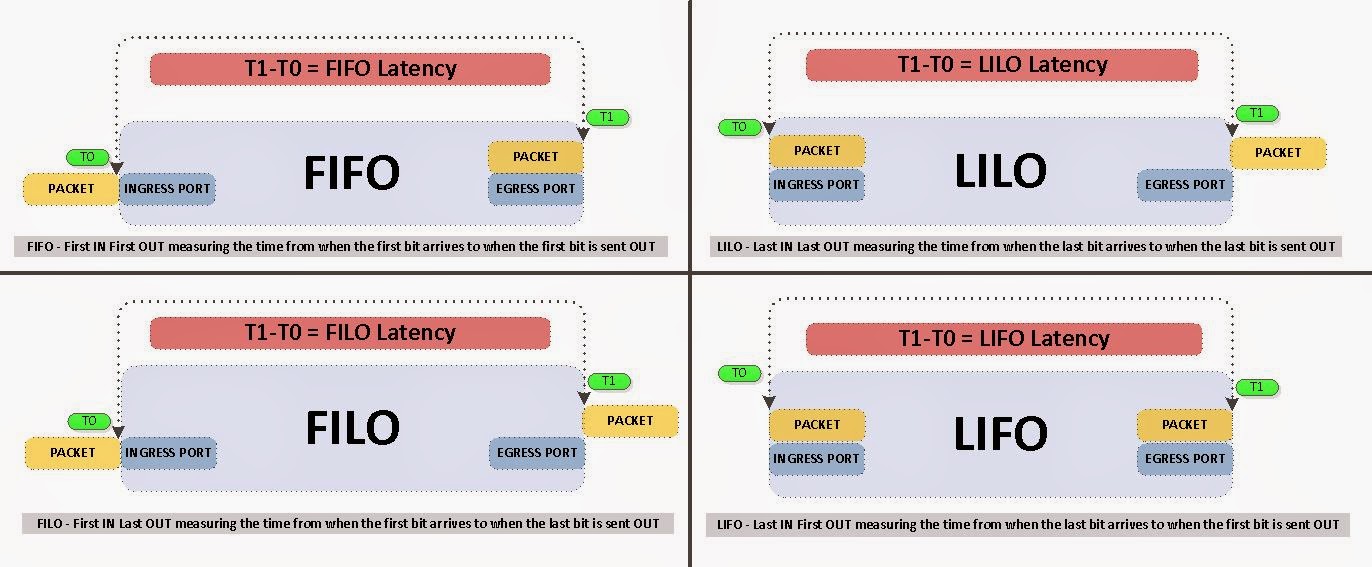
40G might actually delay your packets and here is the reason why.
Before we get too much into the semantics behind this, let define some key terms in latency measurements. I am also going to leave out the minor benefits gained from "inter-frame gap" of 40G packets. If you are interested in further information regarding latency testing/benchmarking standards please see RFC 2544.
Sunday, November 24, 2013
Cisco Nexus 3548 - Configuring Active Latency Monitoring Hidden Cisco commands
In my previous blogtorial 'Cisco Nexus 3548 - Configuring Active Buffer Monitoring' I demonstrated how we can monitor buffer spaces, however what if I wanted to know the latency profile of the entire switch or per port. Enter the world of Cisco hidden commands and that's where you will find 'Active Latency Monitoring' quietly lurking around. These set of commands will enable switch latency profile measurements and give you the per port latency statistics such as total frame count within a time period, the min/max/avg latency for those frames.
For some reason, Cisco decided to keep it hidden although it may be added to the next release. As of now use this command with caution, since it is hidden it is not supported in the configuration (yet).
Here is how you configure 'Active Latency Monitoring' on a Cisco Nexus 3548.
Friday, November 15, 2013
Cisco Nexus 3548 - Configuring Active Buffer Monitoring
It never ceases to amaze me that people value time as money. To me time is more than money. I can make money and I can make more if I worked at it, but time -- that's a different story. I cannot make time, I cannot buy more time, I cannot take it from someone else -- Once it's gone it's gone forever. As I sit here on the train (my daily hour commute) the time it's taking me to write this blogtorial is gone. I can never get it back so hopefully I am doing something worthwhile, something that will help someone, and something that I enjoy. With all that aside let's go into how to configure 'Active Buffer Monitoring' on a Cisco Nexus 3548.
When you are down to nanoseconds on port to port latency, monitoring your buffer space becomes more crucial than ever. Because whenever you buffer your switch is now store and forward for those buffered bytes instead of cut through. If you're switch is store and forward then you are not getting the ~ 230 nanoseconds port-to-port latency that you just spent $20K for.
Before we can dive into configuring buffer monitoring it would be beneficial to understand buffer blocks and how the ports are mapped. First there are 3 buffer blocks each containing 6MB worth of buffer space which gives us a total of 18MB shared buffer. Ports to these buffer blocks (3 x 6MB) are mapped as follows.
When you are down to nanoseconds on port to port latency, monitoring your buffer space becomes more crucial than ever. Because whenever you buffer your switch is now store and forward for those buffered bytes instead of cut through. If you're switch is store and forward then you are not getting the ~ 230 nanoseconds port-to-port latency that you just spent $20K for.
Before we can dive into configuring buffer monitoring it would be beneficial to understand buffer blocks and how the ports are mapped. First there are 3 buffer blocks each containing 6MB worth of buffer space which gives us a total of 18MB shared buffer. Ports to these buffer blocks (3 x 6MB) are mapped as follows.
Tuesday, February 12, 2013
BGP - Configuring mBGP (Multicast BGP)
Do you influence or do you manipulate people to get what you want? What exactly is the difference? I mean in the end, you end up getting what you want right? Wrong, The difference lies in loyalty, if you influence someone then you get them to want to do what you want them to do. If you coerce or manipulate you may achieve short term success, however in the long term you will loose their trust and they will perceive you as someone who violated their trust rather than a leader. Therefore a great leader will influence others to achieve long term success. Although, sometimes you have no choice but to manipulate, for example my wife wants to influence me to do the dishes. Well that's just not going to happen -- she's never going to convince me that I want to do dishes, so she settles for manipulation :). Now that we've gotten my daily tidbit out of the way let's get into the topic at hand which is -- mBGP (Multicast BGP) not to be confused with Multi-protocol BGP which is used by MPLS, IPv6 etc.
Imagine you have Unicast Servers and Multicast Sources on the same network. Furthermore, imagine that you have 2 paths to reach that network, however you want to separate Unicast and Multicast traffic between different paths. How can we achieve this? Well there are a couple of options.

Imagine you have Unicast Servers and Multicast Sources on the same network. Furthermore, imagine that you have 2 paths to reach that network, however you want to separate Unicast and Multicast traffic between different paths. How can we achieve this? Well there are a couple of options.
One, we can add static mroutes downstream or you could run mBGP and since the title of this blogtorial is configuring mBGP we'll choose the latter option.
Consider this simple topology and let's get started.

Complete configs can be found here.
Monday, February 11, 2013
BGP - Neighbor Allowas-in
My apologies -- It's been a while since I have posted, although I been pondering upon a few topics. I have been extremely busy with work, family, studies... -- Yes that's right I am going for my M.S in C.S :). In any case, enough about my boring personal life and excuses lets get into this action packed blogtorial. Here is a simple problem that I ran into the other night. I get a call from my colleague asking me if I would take a look and see why the routes from an eBGP neighbor are not being put into the routing table. After a couple of minutes of troubleshooting I pin-pointed the issue to a BGP loop prevention mechanism "called AS_Path: If you see your own AS in an update, drop it". Fortunately, there is a way to get around this in case we need to.
RFC 1771
Section 9.3 states "If the local AS appears in the AS path of the new route being considered, then that new route cannot be viewed as better than any other route. If such a route were ever used, a routing loop would result."
To illustrate this in action, let's follow this simple topology.
 Complete configurations can be found here.
RFC 1771
Section 9.3 states "If the local AS appears in the AS path of the new route being considered, then that new route cannot be viewed as better than any other route. If such a route were ever used, a routing loop would result."
To illustrate this in action, let's follow this simple topology.

Friday, June 22, 2012
Configuring Cisco ZFW - Cisco Zone Based Firewall
The concept of Cisco Zone Based Firewall (ZFW) is very simple yet can quickly turn into a giant two headed dog if you don't understand how to design it. ZFW basically classifies interfaces into security zones and Intra-zone interfaces can pass traffic freely between each other however traffic between Inter-zone interfaces is restricted by default. A quick example can shed more light on this concept.

Consider the simple topology below and let's get started.

Thursday, June 14, 2012
Configuring CBAC - Context Based Access Control
When it comes to security, I think you should always implement an actual firewall such as an ASA. However if you are a small business and you needed to get a stateful firewall up and running then Cisco Context Based Access Control is the way to go. It's lightweight, easy to configure and it gets the job done.
Consider this topology below and let's see how easily we can get it configured.

Consider this topology below and let's see how easily we can get it configured.

Tuesday, June 5, 2012
Configuring BGP - Remove Private AS
Most of you are familiar with private IP addresses. Right? Well the basic concept behind private IP address is that they should not be in the global ISP routing table. Private IP addresses were created to conserve IPv4 space and not to be routed globally. There is something very similar in the BGP world called Private ASN. Bascially, these ASNs should never be advertised from one ISP to another ISP. BGP Private ASNs are to be used within an organization for internal purposes only.
In this blogtorial we will see how we can remove these private AS before sending our update to an ISP.
Consider this simple topology below and let's begin.

In this blogtorial we will see how we can remove these private AS before sending our update to an ISP.
Consider this simple topology below and let's begin.

Configuring BGP - BGP Backdoor
At one point or another we have all sneaked into our parent's house through the backdoor. Well we are going to be talking about something very similar, however instead of parents house and a sneaking teenager ;) we are going to be discussing about sneaking routes into the routing table via BGP backdoor.
Our objective is to prefer a IGP learned route instead of a eBGP learned route. As we all know that for the most part AD (Administrative distance) dictates what routes gets installed in the routing table.
Consider this simple topology and let's get started.

Our objective is to prefer a IGP learned route instead of a eBGP learned route. As we all know that for the most part AD (Administrative distance) dictates what routes gets installed in the routing table.
Consider this simple topology and let's get started.

Saturday, June 2, 2012
Configuring NAT - NAT Stateful Failover with HSRP
If you work in a high availability environment (largest options exchange in the world) like I do, then you know the value of redundant design. I dislike being caught off-guard and putting out fires. Therefore, I try to make redundancy a part of my design and when "it" hits the fan users aren't breathing down on my neck. And I can actually concentrate on fixing the issue rather than grabbing a bucket of water to put out a house fire. That is the basis for this blogtorial which is how do we configure NAT Stateful Failover with HSRP.
Please read my previous NAT posts if you need a refresher on NAT. At this point, I am assuming you are fairly familiar with NAT and its concepts, so I will get right down to business and spare you the usual 'abc' of NAT'ng.
Consider this simple topology and let's get started.


Thursday, May 31, 2012
Configuring MPLS VPN - Easiest L3VPN Ever
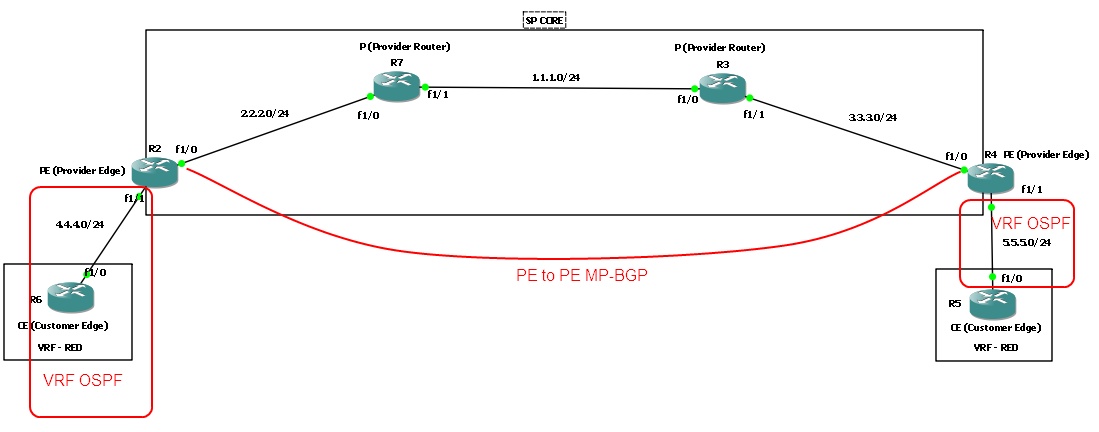
When I used to hear the term MPLS, it would strike fear through my heart. Why? Natural reaction of humans is to fear the unknown or dislike the unknown. In this blogtorial, I will attempt to simplify MPLS as much as possible. And hopefully after going through this blogtorial you'll feel much more comfortable with MPLS and how to configure it.

I will present a brief overview of the router roles involved in MPLS and create a checklist for 'How to configure MPLS L3VPN'. I have browsed various articles and read numerous books on MPLS and none of which gave me what I was looking for -- a basic checklist that went step by step and configured MPLS. Most of them jumped around and wasn't organized in any fashion I liked. So I created my own and I hope you find it as useful as I did.
Consider this topology and let's get started.
Wednesday, May 30, 2012
Configuring BGP - AS PATH PREPEND
Imagine you have 2 ISPs coming into a single router and you have a BGP relationship with both ISPs. One is a 100meg connection from AT&T and the other is a slower internet connection from a local ISP. Your manager requests that we should be using the 100meg connection for outgoing and incoming traffic.Well the outgoing traffic is very easy to manipulate using IGP, metric, PBR, route-maps or whatever your heart desires. But how do we control the inbound traffic? There are a few options available to us, however in this blogtorial we will see how we can manipulate inbound traffic using as path-prepend.

Consider this simple topology and let's get started.

Wednesday, May 23, 2012
Configuring NAT - NAT with route-maps
Fourth post in this NAT series is the 'NAT with route-maps'. In my opinion, using route-map to manipulate NAT is a fairly advanced topic. Therefore make sure to do plenty of labs and read up on docs to understand the concepts. With that being said, let's get started.
Topology we will be using.

Topology we will be using.

Tuesday, May 22, 2012
Configuring NAT - Dynamic NAT with PAT
Third post in this NAT series is "Dynamic NAT with Port Address Translation". Port Address Translation (PAT) works by translating not just the IP address but the ports associated with the connection. It was mainly created to allow many-to-one NAT, so a single public IP can be shared between 1000s of hosts.

Topology we will be using is similar to the ones from my previous posts on this series.

Saturday, May 19, 2012
Configuring NAT - Dynamic Nat w/o PAT
Second post in this NAT series is "Dynamic NAT without Port Address Translation". I will go more into detail about PAT in my next post so for now let's take a quick look at how to configure Dynamic NAT.
Dynamic NAT without Port Address Translation is very similar to Static 1 to 1 NAT in that it still creates a 1 to 1 mapping however it dynamically allocates the NAT IP from a pool of addresses.

Dynamic NAT without Port Address Translation is very similar to Static 1 to 1 NAT in that it still creates a 1 to 1 mapping however it dynamically allocates the NAT IP from a pool of addresses.
Topology we will be using.

Configuring NAT - Static 1-1 NAT
In this series of NAT blogtorials, we will start with a simple static 1 to 1 NAT mapping. Consider the simple topology below and let's dive into the world of NAT.


Friday, April 27, 2012
Propagating Default Routes - EIGRP
There are 4 ways to get default routes into EIGRP topology. We will take a look at all of them. Consider a simple 2 router topology and let's begin.


Tuesday, October 25, 2011
Enterprise Campus Design - Part 1
In this blogtorial we are going to dive into how to effectively and efficiently design an enterprise network. As I have always said "Networking is an art not science" as there are numerous ways to design and I am merely posting one of many.
In this topology we will sink our hands into:
Check out the topology below and let's get started.
 Relevant configurations are posted below.
In this topology we will sink our hands into:
- STP (802.1d)
- HSRP
- OSPF
- OSPF route summarization
- VTP
- Different layers/modules of Enterprise Campus Design
Check out the topology below and let's get started.

Thursday, October 20, 2011
Configuring InterAS MPLS VPNs - CSC (Carriers Supporting Carriers)
In this blogtorial we will take a peek at how to configure InterAS MPLS. InterAS MPLS can be deployed to support customer sites traversing different SPs (Service Providers).
In this topology we will have 3 customer Sites. 2 of them connection to two different PEs routers in the same AS and another site connected to another PE router in a different AS.
Topology below and let's get started.

Relevant configurations are posted below.
In this topology we will have 3 customer Sites. 2 of them connection to two different PEs routers in the same AS and another site connected to another PE router in a different AS.
Topology below and let's get started.

Relevant configurations are posted below.
Subscribe to:
Posts (Atom)