Showing posts with label VPN. Show all posts

Thursday, June 7, 2012

Configuring MPLS - MPLS ttl-propagation

Would you disclose anything less than what you had to about your network? Certainly I follow the logic that the more I disclose the less secure my network becomes.

This post is a follow up from my 'Configuring MPLS - Easiest L3VPN Ever' and in that post I stated that when we do a traceroute from the CE (Customer Edge) router, we can see inside the MPLS cloud and all the next hop routers are exposed to the customers. Check out the screenshot below.


Thursday, May 31, 2012

Configuring MPLS VPN - Easiest L3VPN Ever

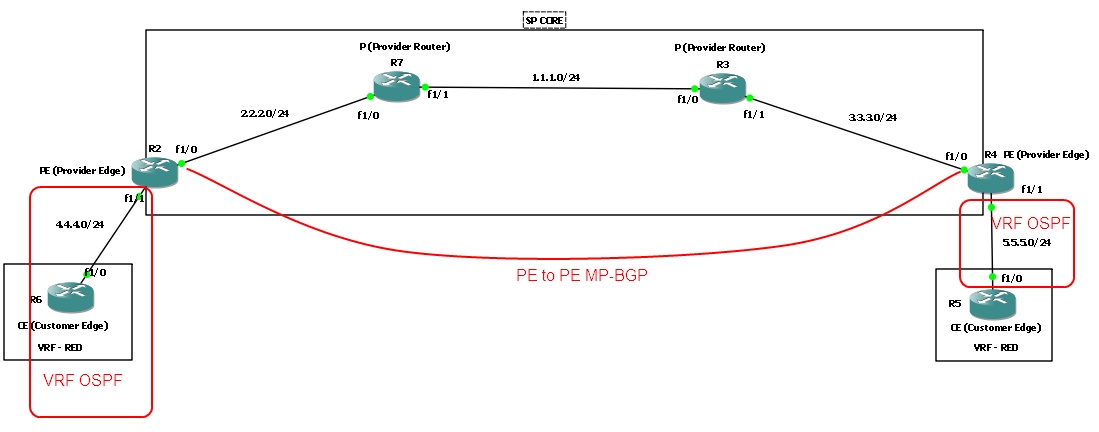
When I used to hear the term MPLS, it would strike fear through my heart. Why? Natural reaction of humans is to fear the unknown or dislike the unknown. In this blogtorial, I will attempt to simplify MPLS as much as possible. And hopefully after going through this blogtorial you'll feel much more comfortable with MPLS and how to configure it.

I will present a brief overview of the router roles involved in MPLS and create a checklist for 'How to configure MPLS L3VPN'. I have browsed various articles and read numerous books on MPLS and none of which gave me what I was looking for -- a basic checklist that went step by step and configured MPLS. Most of them jumped around and wasn't organized in any fashion I liked. So I created my own and I hope you find it as useful as I did. 

Consider this topology and let's get started. 

Tuesday, May 8, 2012

Cisco to Cisco IPsec-manual Decrypt packets - Part 2

Now let's get into decrypting ICMP packets between R1 and R2.

First let's capture some packets between R1 and R2.
  • Right click on the line between R1 and R2
  • Choose R1 f1/0 
  • Click "OK"

Cisco to Cisco IPsec-manual Decrypt packets - Part 1

We will split this blogtorial into 2 parts. Part 1 will concentrate on how to setup up the IPsec-manual tunnel and Part 2 will concentrate on how to decrypt the traffic between the two VPN end points. Reason we are setting up a ipsec-manual instead of a ipsec-isakmp VPN is because we cannot get the IPsec session keys to decrypt the packet if isakmp is used.

Consider this simple 2 router topology and let's get started. 

Saturday, May 5, 2012

Decrypt IPsec packets - Linux to Cisco VPN

In this blogtorial I will demonstrate how to decrypt IPsec packets on a VPN between a Linux machine and a Cisco router. We will be using the setup from my previous blogtorial 'Configuring IPSEC VPN between Linux and Cisco'.

Let's begin.

Thursday, October 20, 2011

Configuring InterAS MPLS VPNs - CSC (Carriers Supporting Carriers)

In this blogtorial we will take a peek at how to configure InterAS MPLS. InterAS MPLS can be deployed to support customer sites traversing different SPs (Service Providers). 

In this topology we will have 3 customer Sites. 2 of them connection to two different PEs routers in the same AS and another site connected to another PE router in a different AS. 

Topology below and let's get started. 


Relevant configurations are posted below.

Monday, October 10, 2011

How to configure QOS with IPSEC VPN

In this blogtorial we will discuss how to do QOS with IPSec and the challenges that are associated with it. 

Consider the topology below and let's get started. 

Relevant configurations are posted below. 

Wednesday, September 28, 2011

Configuring MPLS FRoMPLS DLCI-To-DLCI

Recently, I have been posting about AToM (Any transport over MPLS) and to continue I will post how to configure Frame Relay DLCI-TO-DLCI in this blogtorial.

Consider this simple topology and let's get started.


Relevant configurations are posted below.

Wednesday, September 14, 2011

Configuring DMVPN with OSPF (mGRE and IPSEC)

"I can build you any network you want -- fast/cheap/reliable. Just pick any 2" -- Not sure who said that however  it is true on many levels.

In this blogtorial we are going to take a quick tour on how to configure DMVPN (Dynamic Multipoint Virtual Private Network). So what is DMVPN? DMVPN gives you the ability to create VPN tunnels dynamically as needed between spokes in a hub-to-spoke topology. It can also scale very well to support a large number of remote endpoints. Please keep in mind that DMVPN is Cisco proprietary, however there are ways to implement it using Linux (OpenNHRP).

So here is the topology and let's get started.


Relevant configurations are posted below.

Friday, September 2, 2011

Configuring MPLS Traffic Engineering

In this blogtorial we are going to see how we can configure MPLS Traffic Engineering (MPLS TE). With MPLS TE we can achieve SONET (50ms) style failover between links and we can achieve this by creating backup tunnels and using fast re-route.

In this topology we will be configuring both explicit/static tunnels/paths and also dynamic auto-tunnels. 


Consider the simple topology below and let's get started.


Relevant configurations are posted below.

Wednesday, August 24, 2011

Configuring MPLS L2VPN InterAS VPWS - EoMPLS Port Mode

In this blogtorial I am going to show you a quick how-to on implementing L2VPN and more specifically Virtual Private Wire Service (EoMPLS Port Mode). VPWS can save money thus increasing the revenue for service providers because P2P circuits are usually more expensive. We are going to be configuring EoMPLS (Ethernet Over MPLS - Port Mode). Note: EoMPLS Modes - Port Mode, VLAN mode and VLAN Re-write mode. AToM (Any transport over MPLS) is sort of the umbrella which covers EoMPLS, FRoMPLS, and ATMoMPLS.

Consider the simple topology below.


Relevant configurations are posted below.

Thursday, August 11, 2011

Configuring MPLS L3VPNs

Imagine Site A-1 is in Georgia, A-2 is in Illinois and A-3 is in New York. Full connectivity between all Site A-#s is required. What are our options? Well you can do a full mesh VPN and using the formula n(n-1)/2 where n is the # of sites you can see that we would need to build 6 static VPN tunnels -- needless to say static tunnels are time consuming and does not scale well. Or you can set up DMVPN (Cisco proprietary) which would lessen the work. Or as an ISP we can provide MPLS VPN and the customers wont have to do ANYTHING which is just way they usually like it. Customer site Site A-#s and Customer Site B-#s can all be VPN'd together appropriately and transparently using MPLS.


Consider the topology below.


Objective:
Configure R1 and R2 to support MPLS/OSPF/BGP
Configure the appropriate VRFs on R1 and R2
All Site A routers (R3, R4 and R7) should all be able to transparently ping all Site-A#s loopbacks
All Site B routers (R5 and R6) should all be able to transparently ping all Site-B#s loopbacks
Site A routers (R3, R4, R7) should not be able to ping Site B routers (R5 and R6) and vice-versa

Relevant configurations are posted below. So let's jump right into the complex world of MPLS!!

Friday, August 5, 2011

Configuring IPSEC VPN between Linux and Cisco

In this blogtorial we are going to talk about how to configure a IPSEC VPN between a linux machine (CentOS) and a Cisco router. I  had to do this because we installed a Cisco router at a customer site with a DHCP ip Comcast connection. So in-order to get into the Cisco router to do management I created a ipsec vpn tunnel back to one of my Linux machines. I know I could have done dyndns or something else but it was more fun this way :)


Here is my topology and I will post relevant configuration from the Cisco router and the Linux machine. So let's get started.