Thursday, May 31, 2012

Configuring MPLS VPN - Easiest L3VPN Ever

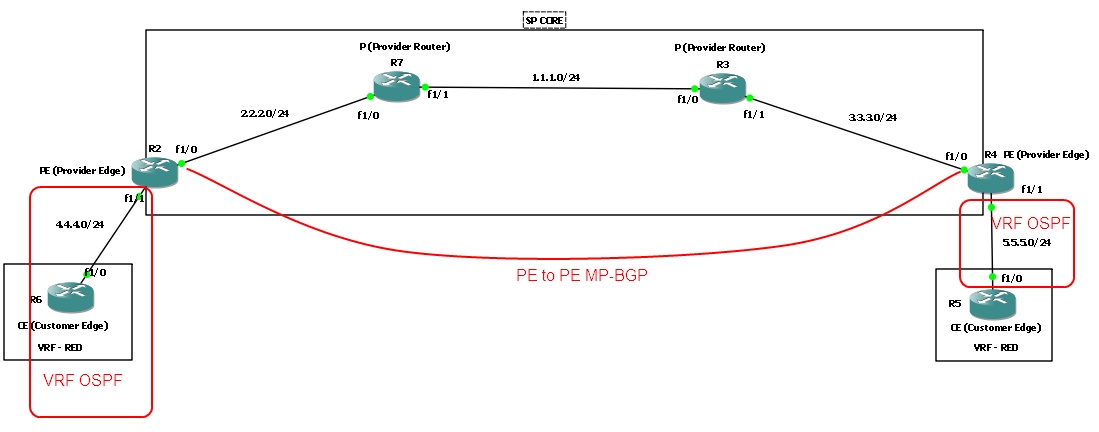
When I used to hear the term MPLS, it would strike fear through my heart. Why? Natural reaction of humans is to fear the unknown or dislike the unknown. In this blogtorial, I will attempt to simplify MPLS as much as possible. And hopefully after going through this blogtorial you'll feel much more comfortable with MPLS and how to configure it.

I will present a brief overview of the router roles involved in MPLS and create a checklist for 'How to configure MPLS L3VPN'. I have browsed various articles and read numerous books on MPLS and none of which gave me what I was looking for -- a basic checklist that went step by step and configured MPLS. Most of them jumped around and wasn't organized in any fashion I liked. So I created my own and I hope you find it as useful as I did. 

Consider this topology and let's get started. 

Wednesday, May 30, 2012

Configuring BGP - AS PATH PREPEND

Imagine you have 2 ISPs coming into a single router and you have a BGP relationship with both ISPs. One is a 100meg connection from AT&T and the other is a slower internet connection from a local ISP. Your manager requests that we should be using the 100meg connection for outgoing and incoming traffic.Well the outgoing traffic is very easy to manipulate using IGP, metric, PBR, route-maps or whatever your heart desires. But how do we control the inbound traffic? There are a few options available to us, however in this blogtorial we will see how we can manipulate inbound traffic using as path-prepend.

Consider this simple topology and let's get started. 

Wednesday, May 23, 2012

Configuring NAT - NAT with route-maps

Fourth post in this NAT series is the 'NAT with route-maps'. In my opinion, using route-map to manipulate NAT is a fairly advanced topic. Therefore make sure to do plenty of labs and read up on docs to understand the concepts. With that being said, let's get started.

Topology we will be using.


Tuesday, May 22, 2012

Configuring NAT - Dynamic NAT with PAT

Third post in this NAT series is "Dynamic NAT with Port Address Translation". Port Address Translation (PAT) works by translating not just the IP address but the ports associated with the connection. It was mainly created to allow many-to-one NAT, so a single public IP can be shared between 1000s of hosts.

Topology we will be using is similar to the ones from my previous posts on this series. 

Saturday, May 19, 2012

Configuring NAT - Dynamic Nat w/o PAT

Second post in this NAT series is "Dynamic NAT without Port Address Translation". I will go more into detail about PAT in my next post so for now let's take a quick look at how to configure Dynamic NAT.


Dynamic NAT without Port Address Translation is very similar to Static 1 to 1 NAT in that it still creates a 1 to 1 mapping however it dynamically allocates the NAT IP from a pool of addresses. 

Topology we will be using. 
 

Configuring NAT - Static 1-1 NAT

In this series of NAT blogtorials, we will start with a simple static 1 to 1 NAT mapping. Consider the simple topology below and let's dive into the world of NAT.

Tuesday, May 8, 2012

Cisco to Cisco IPsec-manual Decrypt packets - Part 2

Now let's get into decrypting ICMP packets between R1 and R2.

First let's capture some packets between R1 and R2.
  • Right click on the line between R1 and R2
  • Choose R1 f1/0 
  • Click "OK"

Cisco to Cisco IPsec-manual Decrypt packets - Part 1

We will split this blogtorial into 2 parts. Part 1 will concentrate on how to setup up the IPsec-manual tunnel and Part 2 will concentrate on how to decrypt the traffic between the two VPN end points. Reason we are setting up a ipsec-manual instead of a ipsec-isakmp VPN is because we cannot get the IPsec session keys to decrypt the packet if isakmp is used.

Consider this simple 2 router topology and let's get started. 

Saturday, May 5, 2012

Decrypt IPsec packets - Linux to Cisco VPN

In this blogtorial I will demonstrate how to decrypt IPsec packets on a VPN between a Linux machine and a Cisco router. We will be using the setup from my previous blogtorial 'Configuring IPSEC VPN between Linux and Cisco'.

Let's begin.

Wednesday, May 2, 2012

Configuring ACLs - ACL Resequence

In this blogtorial we will see how ACLs are sequenced and how we can resequence if we need to. ACL's initially start with sequence number of 10 and increments each entry by 10 unless specified.

Let's take a look.

Monday, April 30, 2012

Propagating Default Routes - OSPF

How to get default routes into OSPF routing domain? Well, there is really just about one way to do it. It is by using default-information originate.

Consider this simple topology below and follow the screenshots.


Troubleshooting - Loop-back detected - %PM-4-ERR_DISABLE

Recently, I was tasked with troubleshooting a weird problem where one of the interfaces was err-disabled. Fun Monday mornings :) and sifting through the logs I came up on this error message. 

%PM-4-ERR_DISABLE: loopback error detected on Fa1/0/20, putting Fa1/0/20 in err-disable state
%ETHCNTR-3-LOOP_BACK_DETECTED: Loop-back detected on FastEthernet1/0/20.

Turns out that this was because of an interface somewhere in our network was configured incorrectly which then created a loop in our network. The STP topology in our network corrected/recovered itself within a few seconds and fa1/0/20 should have "err-disabled recovered", however "errdisable recovery cause loopback" was not configured. 

Basically this error message states that the keepalives which are on by default are looping back to the source interface.  

For example, if a keepalive was sent on fa1/0/20 and if that keepalive packet loops around the network and shows up at the source interface then that must mean that there is a loop in our network and the interface which sent out the keepalive will be err-disable.  

Notice that the keepalive are set to 10sec by default on all interfaces. 
Workarounds: 
  • Fix the underlying misconfigured interface downstream and/or upstream.
  • Disable keepalives on interfaces. 
Many more articles to come so stay tuned. "Join this site" on the right / click +1 below ------->
Friday, April 27, 2012

Propagating Default Routes - EIGRP

There are 4 ways to get default routes into EIGRP topology. We will take a look at all of them. Consider a simple 2 router topology and let's begin.

Configuring /31 - P2P or Segment with 2 endpoints

In general, most ISPs will assign a /30 on point-to-point interfaces which gives you 4 IP addresses and 2 of which are usable resulting in 50% of addresses in that subnet being wasted. For example 1.1.1.0/30 yields 1.1.1.1 and 1.1.1.2 as your usable IP addresses and 1.1.1.0 is the subnet number and 1.1.1.3 is the broadcast address. And as you can see only 2 out of the 4 IP addresses are usable. So how we can be more efficient? The use of a /31 subnet mask which gives you 2 IP addresses and 100% of them will be utilized.

Consider a very simple topology below and let's get started.