Thursday, April 9, 2015

Troubleshooting eBGP peering

Simple .... BGP topology ... can you get eBGP up and running between R1 and R2?

Objective:

Establish successful and stable eBGP relationship between R1 and R2. With the current start-up config, BGP is IDLE. 

Topology diagram and startup config are posted below.


Monday, April 6, 2015

Configuring OSPF - area range vs summary-address

In this blogtorial we are going to take a look at the difference between area range vs summary-address command both of which can be used for OSPF summarization/filtering. Both area range and summary-address commands can also be used for OSPF route filtering. In addition, we will also discuss a few options that are available with area range and summary-address command and pitfalls to be on the lookout for.

Simple topology below and let's get started.


Tuesday, March 24, 2015

Configuring OSPF - Summarization Lab

As the CCIE Lab exam requires you to the think outside the box a bit, I will do the same on this lab. Here is a simple topology and the basic start up configuration.

Objectives:

  • Summarize 192.168.1.2/32 from Area 2 as 192.168.1.0/24 into area 0.

Restrictions:

  • Do not use area-range command or summary-address to summarize the routes into Area 0.
  • R3 and other routers in Area 0 or any new additional areas should only have the summary address to reach 192.168.1.2. 
  • If prefix 192.168.1.2/32 is withdrawn (i.e shutdown loopback0 on R2) from R1 OSPF database then 192.168.1.0/24 should not be summarized/advertised into area 0.

Friday, March 20, 2015

Cisco BUG - PIM join does not make it to CPU

Cisco BUG

CSCue52328 Bug Details
PIM joins for some groups not processed at CPU level
Symptom:
Under very rare conditions PIM joins from a downstream switch are not forwarded my mcastfwd to PIM
to be processed. This has been seen under the following conditions

a) Downstream device sending PIM joins is a Arista switch
b) There is a local receiver sending IGMP joins for the same group for which PIM joins are received
c) Exact trigger is unknown at this point, could be the remote receivers (which result in PIM joins)
flapping

Thursday, March 12, 2015

Precision Time Protocol PTP - Demystified

As Network Engineers we build highways (maybe Bundesautobahn where there are no speed limits) on top of which various protocols travel. As designers/architects, perhaps it would be beneficial for us to understand what is traveling on the highways we build.

I started to dip my feet into PTP and I realized there is more to PTP than meets the eye. I also realized that I knew very little about its operations so I decided instead of dipping my feet why not just dive right in -- head first. As any curious person would do, I started to read the RFCs and white papers. But before we get into PTP's operation, let's define a handful of key terms.

Tuesday, February 10, 2015

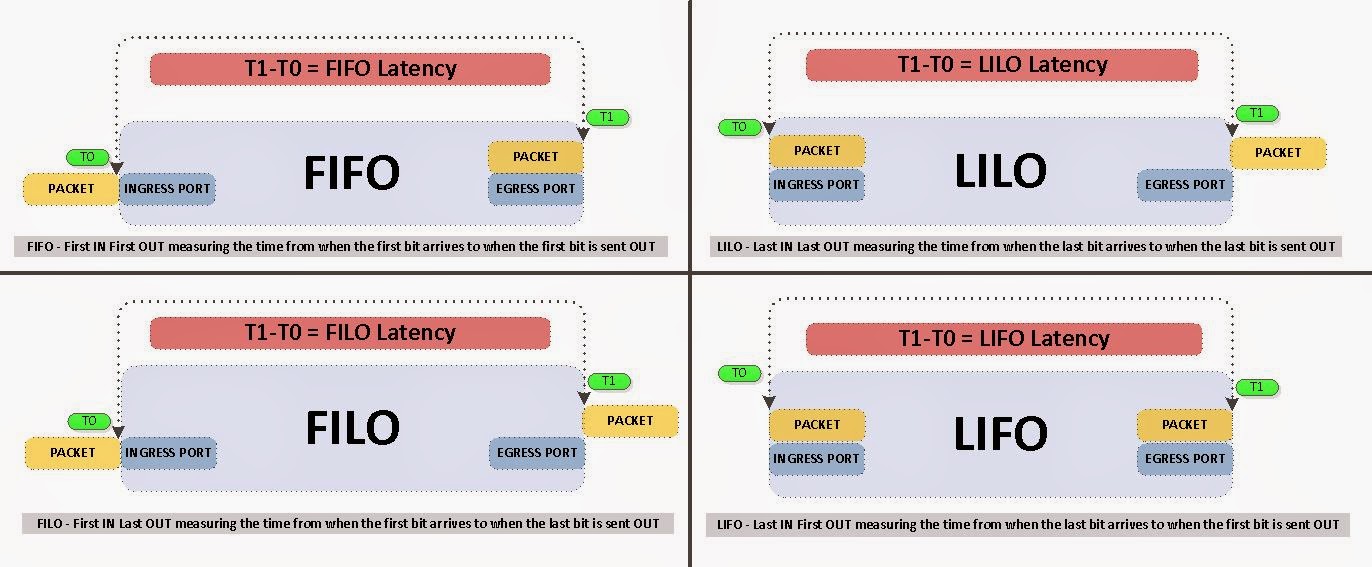
40G MORE is NOT always BETTER - Why 40G can potentially delay your packets?

40G might actually delay your packets and here is the reason why. 
Before we get too much into the semantics behind this, let define some key terms in latency measurements. I am also going to leave out the minor benefits gained from "inter-frame gap" of 40G packets. If you are interested in further information regarding latency testing/benchmarking standards please see RFC 2544.

Monday, February 2, 2015

Troubleshooting OSPF - LAB 1

Here is a quick lab I put together to really test your knowledge about OSPF Path selection and some of the hidden rules behind the path selection.

Simple topology below.


Objective: 
  • R3 should choose R2 over Gi1.23 to reach R1 loopback 150.1.1.1/32. Imagine that this is a 40Gbit link where as Gi1.13 is just a 100Mb link. Currently R3 is choosing Gi1.13 to reach R1 loopback 150.1.1.1/32. 
Restrictions:
  • Do not configure any new routing protocols.
  • Do not change Area numbers.
  • Do not create any NEW areas. 
  • Do not change OSPF cost values
  • R3 should choose R1 with OSPF as the routing protocol so no STATIC routes etc. 
Configuration excerpts below so you can configure it in your lab.

Friday, January 9, 2015

EIGRP - Troubleshooting LAB 1

Objective:
  • When Gig2 is shutdown on R1, metric for the route to reach Loopback1 should not change on R2.  
Here is a simple topology and let's get started.


Monday, December 29, 2014

EIGRP - Extended NAMED ACLs are not allowed in distribute-list.

Quick post regarding an error message I came across when trying to configure eigrp distribute-list with extended NAMED ACLs.

% The ACL cannot be created or an ACL with the same name but incompatible type already exists.

Router version CSR1000v - Cisco IOS Software, CSR1000V Software (X86_64_LINUX_IOSD-UNIVERSALK9-M), Version 15.4(2)S, RELEASE SOFTWARE (fc2)

 R5(config)#ip access-list extended PBR_EIGRP  
 R5(config-ext-nacl)#deny ip host 155.1.0.1 host 150.1.4.4  
 R5(config-ext-nacl)#deny ip host 155.1.0.3 host 150.1.4.4  
 R5(config-ext-nacl)#deny ip host 155.1.0.4 host 150.1.4.4  
 R5(config-ext-nacl)#deny ip host 155.1.0.1 host 150.1.6.6  
 R5(config-ext-nacl)#deny ip host 155.1.0.3 host 150.1.6.6  
 R5(config-ext-nacl)#deny ip host 155.1.0.4 host 150.1.6.6  
 R5(config-ext-nacl)#deny ip host 155.1.0.1 host 150.1.1.1  
 R5(config-ext-nacl)#deny ip host 155.1.0.2 host 150.1.1.1  
 R5(config-ext-nacl)#deny ip host 155.1.0.4 host 150.1.1.1  
 R5(config-ext-nacl)#deny ip host 155.1.0.1 host 150.1.2.2  
 R5(config-ext-nacl)#deny ip host 155.1.0.2 host 150.1.2.2  
 R5(config-ext-nacl)#deny ip host 155.1.0.4 host 150.1.2.2  
 R5(config-ext-nacl)#deny ip host 155.1.0.3 host 150.1.7.7  
 R5(config-ext-nacl)#deny ip host 155.1.0.2 host 150.1.7.7  
 R5(config-ext-nacl)#deny ip host 155.1.0.4 host 150.1.7.7  
 R5(config-ext-nacl)#deny ip host 155.1.0.3 host 150.1.9.9  
 R5(config-ext-nacl)#deny ip host 155.1.0.2 host 150.1.9.9  
 R5(config-ext-nacl)#deny ip host 155.1.0.4 host 150.1.9.9  
 R5(config-ext-nacl)#permit ip any any  

 R5(config-router)#distribute-list PBR_EIGRP in
 % The ACL cannot be created or an ACL with the same name but incompatible type already exists.
 R5(config-router)#^Z

Thursday, December 18, 2014

CCIE v5 INE Home Lab - Part 3 - Console to Routers / Automating scripts

Don't you love it when it all comes together and all the puzzle pieces fall into place. Well I hope that this blogtorial does exactly that. In part 1 and part 2, we laid the groundwork and the foundation to successfully get a lab up and running and in this blogtorial we are going to finish it off with:
  • How to console into the virtual routers? 
  • How to get all initial configs prep'd so we can have concentrate on doing the labs rather than setting up the labs?
  • How to automate the loading of the initial configs? 
I know it's a lot to cover in one post, but I also didn't want to breakup this series into too many parts. So without further adieu, let's get started and I will try to streamline it and post as much screenshots as possible. Here is the overview and where we will be spending most of the blogtorial.


I normally would do it for free but I have had tons of requests and questions regarding the lab setup and scripts. So for a nominal fee I will configure your entire VMWare ESXi server / all the routers / the Linux VMs / auto loading scripts. More importantly it includes an easy to use WEB GUI to load the config files. Contact me via arwinr@gmail.com if you are interested. 

Screenshot of the WEB GUI. 

Note: Thomas Kjær pointed out in one of the comments below that ESXi version 6 recently released does not limit 4 serial per Linux VM. Therefore, instead of creating 4 linux VM you could just do it all in one Linux VM, but you would have to edit the scripts accordingly. 

Thursday, November 13, 2014

CCIE v5 INE Home Lab - Part 2 - Configuring CSR1000v on VMware ESXi and connecting Physical Switches

CCIE is not earned by completing the written and passing the lab, CCIE is earned in the 1000s of hours of lab, the 3am wake ups, and the countless of hours of studying ... that's what makes you a CCIE. While you are on this journey you are going to go through a transformation, and you will start to see things differently, you will start to troubleshoot differently, you will start to perceive situations differently and simply put ... you just become one of the best at your craft .... with that being said ....

In part 2 of this series, we will configure 10 CSR routers, and connect it to the virtual switch that we created in Part 1. Unlike many other tutorials on the Internet that demonstrates how to get serial over network to console into the routers, I am going to take a different approach on how to console into the routers. Main reason is that serial over network is only available for either 60 days as a demo or you have to get the enterprise license which is over $2000.


I normally would do it for free but I have had tons of requests and questions regarding the lab setup and scripts. So for a nominal fee I will configure your entire VMWare ESXi server / all the routers / the Linux VMs / auto loading scripts. More importantly it includes an easy to use WEB GUI to load the config files. Contact me via arwinr@gmail.com if you are interested. 

Screenshot of the WEB GUI. 

Tuesday, November 11, 2014

Understanding OSPF - Forward Metric in E2 Routes

In this blogtorial we are going to look into a minor detail regarding OSPF E2 routes that most literature happen to leave out and that is the Forward Metric of E2 routes. Cisco NX-OS and Arista EOS don't even show this Forward Metric in their output of show commands. As you are probably studying for your CCNA or CCNP you are told that the main difference between OSPF E2 vs E1 routes is that E1 takes into consideration the costs of each hop to reach the ASBR while E2 metric is by default 20. What if I told you that routers do consider cost of the path to the ASBR even for E2 routes with a default metric of 20? Before you get fooled into believing otherwise, take a look at the topology below.

As a side note the metric of redistributed E2 routes varies by platform, for example it is 1 in Arista.

Simple topology below ...

CCIE v5 INE Home Lab - Part 1 - Configuring VMware ESXi

"Every day you wake up you have two options, you can either look at the clock at 3:30am, tap the snooze button, go back to sleep, and dream about being a CCIE or you can tap into that whisper inside you telling you to get up and go pursue your dream about being a CCIE" .... with that being said ....

I've spent numerous hours exploring many different options on setting up the CCIE v5 hybrid (physical/virtual) home lab and I've finally settled on VMware ESXi. Although, you have many other options like Linux/KVM/VirtualBox, this method was the easiest for me. I am going to break this topic "CCIE v5 INE Home Lab" into a 3 part series blogtorial. If you follow the series step by step, you will end up with a complete home lab with everything you need to do the INE labs.

Here is an overview of the entire series and how it will be split up.

Part 1 - How to install and configure VMware ESXi Hypervisor and vSwitch? 
Part 3 - Script to automate the loading of initial router configs.

I normally would do it for free but I have had tons of requests and questions regarding the lab setup and scripts. So for a nominal fee I will configure your entire VMWare ESXi server / all the routers / the Linux VMs / auto loading scripts. More importantly it includes an easy to use WEB GUI to load the config files. Contact me via arwinr@gmail.com if you are interested. 

Screenshot of the WEB GUI. 


Note: Thomas Kjær pointed out in one of the comments below that ESXi version 6 recently released does not limit 4 serial per Linux VM. Therefore, instead of creating 4 linux VM you could just do it all in one Linux VM, but you would have to edit the scripts accordingly. 

Monday, November 3, 2014

CCIE Journey - 11/3/14 - Study Plan v5

I am back on the CCIE v5 studies again. I have been studying on and off for a few years now, but now I am motivated more than ever. After reviewing blogs/discussion boards on how people who are also on the same grueling but equally rewarding journey studied for their CCIE exam, I put together a study schedule that I believe fits my busy schedule. The most challenging aspect of studying for one of the toughest exam is finding "uninterrupted" time slots where you can actually study. People always ask me “when do you find the time to study with family, kids, work and life?” My response to them is always the same "you don’t find time. You and I both have the same amount of time in day. What matters is how you utilize it". If you need more time to do what you want – then be awake for most of the day and get up early!!

CCIE has been sort of like a light switch in my brain that I have been turning on and off and this time I am rewiring this light directly into the main grid and it's staying on ... constant. Here is the study schedule for now till I get closer to my full 8hr labs.