Well it is official. I've signed up for a git hub account. I can now start publishing some open source tools on my free time to help my fellow engineers and tech enthusiasts.
Here is the link to my git repo that you can clone for yourself and contribute or use it.
https://github.com/ithitman/
Tuesday, January 10, 2017

Sunday, January 1, 2017
Interaction between TLP (Tail Loss Probe) and SolarFlare EF_DYNAMIC_ACK_THRESH
In this blogtorial I will briefly discuss a performance issue that had me stumped for a bit. But after some googling around I stumbled up on the answer. I then started to take apart the RFC to gain a better understanding at the mischievous protocols at play. Oil powers the world and water sustains life, however they do not mix well together and the same concept applies here. Tail loss probe on its own is a great feature reducing the time it takes to detect packet loss and makes the TCP connection much more efficient. SolarFlare EF_DYNAMIC_ACK_THRESH is also a great feature which helps TCP performance. But enable these features at the same time and your TCP performance will suffer greatly.
Sunday, December 4, 2016
CCIE #52966 R&S - First Attemp Pass
Hello fellow future CCIE's and blog readers ... I've done it and I can't express my excitement in words. I know I have not posted in a while due to personal issues right after achieving my CCIE, however I am starting the blog engine again. In this blog I am going to document some important information regarding my preparation, stuff I did before/during/after the lab exam, and hopefully give some insights / motiviation that might help you during your exam.
Lots of people ask me how do I feel being a CCIE? First off, I feel no different as I am the same engineer I was before I passed the CCIE exam, but the journey of becoming a CCIE has greatly changed my attitude and my day to day behavior on how I approach issues (both personally and professionally). The journey itself was much more important to me than passing the actual lab exam ... and as you go through your preparation keep one thing in mind "Championships aren’t won in the theater of the arena. They are won in the thousands of hours of training ... when everyone else is sleeping. That’s where it’s won. The heart of a champion is a light switch that’s always on – it doesn’t go on and off when someone’s watching – it’s constant" - (Greg Plitt RIP). The passing of the exam was just a general indication of my progression so do not get discouraged if you fail the first time. Just keep trying till you get to the finish line and grab that number.
Wednesday, April 13, 2016
Date Set - 5/27/16 - CCIE R&S v5 1st Try
Booked my CCIE R&S v5 lab on 5/27/16 in San Jose, CA. Check back here for more updates on my experience ...

Let's do this ...

Let's do this ...
Wednesday, December 23, 2015
This is why I post ...
I normally post "How-to articles..." however, I figured this time I'd share a thought that came into my head yesterday as I was watching "Grey's Anatomy". Now I am not particularly a big fan of that show but my wife had a surgery recently and while she was on bed rest, I started to watch the show with her. In one of the episodes, it was revealed that Meredith's mother wrote down all of her research because she was going to get Alzheimer and would eventually forget everything. As I was watching this episode, suddenly a thought popped into my head ... "why do you write how-tos/blogs? ... it's time consuming ... you could be doing something else instead...?" ... As I laid awake mulling over on this thought ... I realized that there are more than one reason as to why I write ...
Sunday, December 13, 2015
Configuring LDP - Label Distribution Protocol
In this blogtorial we will go over the basics of LDP, discuss how LDP adjacencies are formed, and also take a look at LDP packets on the wire to gain better understanding of the inner workings of LDP.
LDP stands for Label Distribution Protocol and it is used by routers to share label information about prefixes. For more information regarding LDP check out RFC 5036. At a high glance, LDP first uses UDP hello messages to discover neighbors on the shared segment and then forms a TCP peering with the LDP neighbor to share the label to prefix mapping information. We will see this in detail (packet captures) later in this blogtorial.
Here is a simple topology to follow along.

Monday, December 7, 2015
Configuring DMVPN Phase 3 w/ EIGRP
In this blogtorial we will configure DMVPN Phase 3 and run EIGRP over the tunnel. After reading this blogtorial, I hope that you will have a clear understanding of DMVPN Phase 3 and how it interacts with EIGRP. If you need a primer on DMVPN Phase 1 and Phase 2, please see my DMVPN blogtorials.
Here is the topology.

Here is the topology.

Configuring DMVPN Phase 2 w/ EIGRP
In this blogtorial we will configure DMVPN Phase 2 and configure EIGRP over the DMVPN tunnel. Over the past few blogtorials we've been concentrating on how to configure DMVPN Phase 1 and routing protocols over DMVPN Phase 1. One of the key disadvantage of Phase 1 is that all spoke to spoke traffic must pass through the HUB which is a bit inefficient. DMVPN Phase 2 improves on DMVPN Phase 1 by allowing for on-demand dynamic spoke to spoke tunnels based on traffic patterns.
Here is our topology.

Here is our topology.

Saturday, December 5, 2015
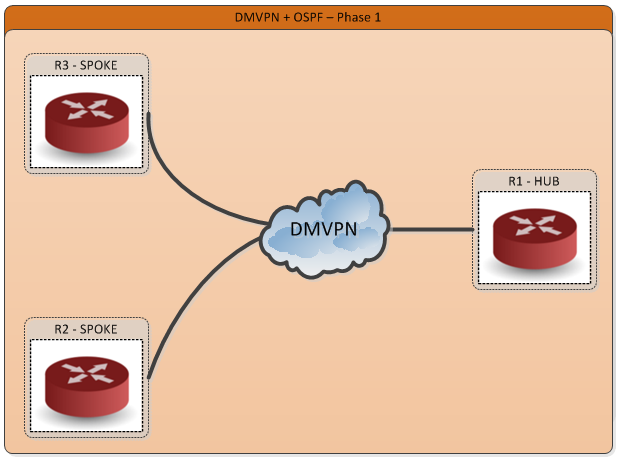
Configuring DMVPN Phase 1 w/ OSPF
In this blogtorial, we will configure DMVPN Phase 1 with OSPF and walk through some gotchas and some pitfalls to be on the look out for.
Due to the hierarchical nature of OSPF and other adjacency intricacies, OSPF is generally discouraged in a DMVPN design.

Due to the hierarchical nature of OSPF and other adjacency intricacies, OSPF is generally discouraged in a DMVPN design.
We are using the same topology as my previous blogtorial "Configuring DMVPN w/ IPSEC and EIGRP", however I'll post the base configs here as well.
Here is our topology.
Configuring DMVPN Phase 1 w/ IPSEC and EIGRP
In this blogtorial we will take a look at how to configure DMVPN, EIGRP over DMVPN and get the traffic going over the DMVPN encrypted using IPSEC. We will break the blogtorial in 3 parts. First we will configure the DMVPN / tunnel and verify end-to-end IP connectivity, then we will move on to configuring routing over the tunnel and finally get IPSEC configured to encrypt everything going over the tunnel.
Here is our topology.

Here is our topology.

Friday, December 4, 2015
Configuring IPSEC VTI (Virtual Tunnel Interfaces)
In this blogtorial, we will briefly explore how to configure IPSEC Virtual Tunnel Interfaces. One of the main advantages of Virtual Tunnel Interfaces is that you do not have to configure an ACL to match all "interesting traffic", thereby minimizing the number of IPSEC security associations (SAs) that must be created.
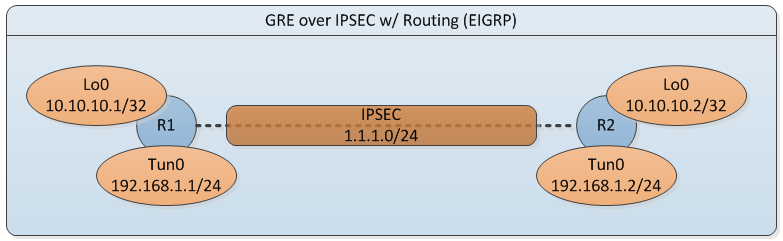
We'll use the same simple topology from my previous blogtorial "Configuring GRE over IPSEC w/ Routing".
We'll use the same simple topology from my previous blogtorial "Configuring GRE over IPSEC w/ Routing".
Saturday, November 28, 2015
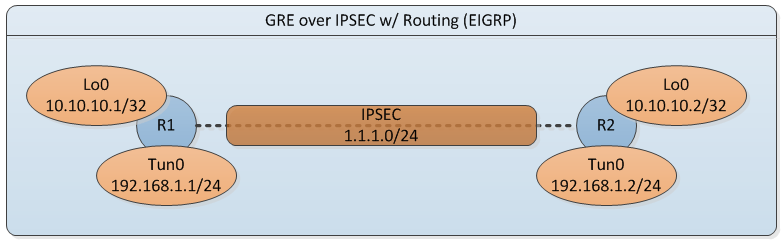
Configuring GRE over IPSEC w/ Routing (EIGRP)
In this blogtorial, we will briefly explore how to configure GRE tunnels over IPSEC with routing (EIGRP). In addition, we will take a closer look down at the packet level on how GRE interacts with IPSEC. Take a look at the simple topology below and let's get started.
Sunday, October 25, 2015
Configuring IPSEC VPN w/ Crypto Maps
In this blogtorial, we will set up a simple preshared key IPSEC VPN tunnel between two routers. We will also use the same topology for my next blogtorial 'Troubleshooting IPSEC VPN'. Lot's of debug and output posted with comments, see below. "Complexity is the enemy of security" therefore we will keep this a simple topology and get started.


Sunday, October 18, 2015
Decoding TimeStamping on Arista 7150
If you need a primer on 'How to configure PTP' on Arista click here. If you understand Arista's implementation of PTP then wait no further and read the rest of the blogtorial on how to decode them from a RAW packet capture.
Key frames DATA is 46bytes and is broken down as follows. What is in bold is important for calculating UTC time of a given packet.
8Bytes - ASIC Ticks
8Bytes - UTC in ns
8Bytes - LAST SYNC
8Bytes - KEY TS
8Bytes - EGRESS Interface DROPS
2Bytes - User defined DEVICE ID
2Bytes - Egress interface of the keyframe
1Byte - FCS TYPE
1Byte - RESERVED
Key frames DATA is 46bytes and is broken down as follows. What is in bold is important for calculating UTC time of a given packet.
8Bytes - ASIC Ticks
8Bytes - UTC in ns
8Bytes - LAST SYNC
8Bytes - KEY TS
8Bytes - EGRESS Interface DROPS
2Bytes - User defined DEVICE ID
2Bytes - Egress interface of the keyframe
1Byte - FCS TYPE
1Byte - RESERVED
Subscribe to:
Posts (Atom)