Friday, June 8, 2012

Configuring BGP - Local AS - One router multiple ASN

Wouldn't it be awesome if you had two first names and you had the choice to use whichever one you wanted based on some criteria? Well in BGP your first names are your ASN (Autonomous System Numbers). In BGP you can only spin up one instance of BGP with an ASN unlike OSPF or other routing protocols. For example, you will get this error message if you try to spin up more than one instance.


R2(config)#router bgp 200
R2(config-router)#exit
R2(config)#router bgp 201
BGP is already running; AS is 200

So what do you do when you need to have more than one ASN number on the same router? This is where local-as comes in handy. 

Consider this simple topology below and let's get started. 

Thursday, June 7, 2012

Configuring MPLS - MPLS ttl-propagation

Would you disclose anything less than what you had to about your network? Certainly I follow the logic that the more I disclose the less secure my network becomes.

This post is a follow up from my 'Configuring MPLS - Easiest L3VPN Ever' and in that post I stated that when we do a traceroute from the CE (Customer Edge) router, we can see inside the MPLS cloud and all the next hop routers are exposed to the customers. Check out the screenshot below.


Tuesday, June 5, 2012

Configuring BGP - Remove Private AS

Most of you are familiar with private IP addresses. Right? Well the basic concept behind private IP address is that they should not be in the global ISP routing table. Private IP addresses were created to conserve IPv4 space and not to be routed globally. There is something very similar in the BGP world called Private ASN. Bascially, these ASNs should never be advertised from one ISP to another ISP. BGP Private ASNs are to be used within an organization for internal purposes only.

In this blogtorial we will see how we can remove these private AS before sending our update to an ISP.

Consider this simple topology below and let's begin.


Bypassing Firewalls - Reverse SSH Tunneling

Have you ever found yourself in the situation where you need remote access to internal resources but don’t have the time (or maybe authority) to make changes to the network firewall?  If so, you are in luck!

This tutorial shows how SSH can be used to connect to machines that are not accessible via the internet without 1-to-1 NAT, firewall exceptions, etc...  With this you can bypass NAT and incoming FIREWALL restrictions.  Examples of when this would be used include: getting a remote shell on a firewall’d server (see diagram below), establishing VNC or RDP sessions to NAT’d servers (see guide below), etc...


Configuring BGP - BGP Backdoor

At one point or another we have all sneaked into our parent's house through the backdoor. Well we are going to be talking about something very similar, however instead of parents house and a sneaking teenager ;) we are going to be discussing about sneaking routes into the routing table via BGP backdoor.

Our objective is to prefer a IGP learned route instead of a eBGP learned route. As we all know that for the most part AD (Administrative distance) dictates what routes gets installed in the routing table.

Consider this simple topology and let's get started.


Saturday, June 2, 2012

Configuring NAT - NAT Stateful Failover with HSRP

If you work in a high availability environment (largest options exchange in the world) like I do, then you know the value of redundant design. I dislike being caught off-guard and putting out fires. Therefore, I try to make redundancy a part of my design and when "it" hits the fan users aren't breathing down on my neck. And I can actually concentrate on fixing the issue rather than grabbing a bucket of water to put out a house fire. That is the basis for this blogtorial which is how do we configure NAT Stateful Failover with HSRP.

Please read my previous NAT posts if you need a refresher on NAT. At this point, I am assuming you are fairly familiar with NAT and its concepts, so I will get right down to business and spare you the usual 'abc' of NAT'ng. 

Consider this simple topology and let's get started.


Thursday, May 31, 2012

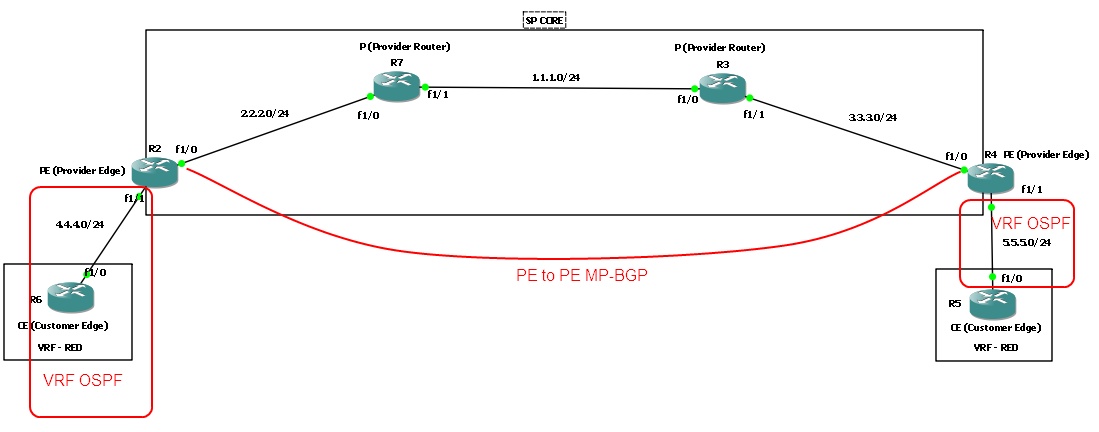
Configuring MPLS VPN - Easiest L3VPN Ever

When I used to hear the term MPLS, it would strike fear through my heart. Why? Natural reaction of humans is to fear the unknown or dislike the unknown. In this blogtorial, I will attempt to simplify MPLS as much as possible. And hopefully after going through this blogtorial you'll feel much more comfortable with MPLS and how to configure it.

I will present a brief overview of the router roles involved in MPLS and create a checklist for 'How to configure MPLS L3VPN'. I have browsed various articles and read numerous books on MPLS and none of which gave me what I was looking for -- a basic checklist that went step by step and configured MPLS. Most of them jumped around and wasn't organized in any fashion I liked. So I created my own and I hope you find it as useful as I did. 

Consider this topology and let's get started. 

Wednesday, May 30, 2012

Configuring BGP - AS PATH PREPEND

Imagine you have 2 ISPs coming into a single router and you have a BGP relationship with both ISPs. One is a 100meg connection from AT&T and the other is a slower internet connection from a local ISP. Your manager requests that we should be using the 100meg connection for outgoing and incoming traffic.Well the outgoing traffic is very easy to manipulate using IGP, metric, PBR, route-maps or whatever your heart desires. But how do we control the inbound traffic? There are a few options available to us, however in this blogtorial we will see how we can manipulate inbound traffic using as path-prepend.

Consider this simple topology and let's get started. 

Wednesday, May 23, 2012

Configuring NAT - NAT with route-maps

Fourth post in this NAT series is the 'NAT with route-maps'. In my opinion, using route-map to manipulate NAT is a fairly advanced topic. Therefore make sure to do plenty of labs and read up on docs to understand the concepts. With that being said, let's get started.

Topology we will be using.


Tuesday, May 22, 2012

Configuring NAT - Dynamic NAT with PAT

Third post in this NAT series is "Dynamic NAT with Port Address Translation". Port Address Translation (PAT) works by translating not just the IP address but the ports associated with the connection. It was mainly created to allow many-to-one NAT, so a single public IP can be shared between 1000s of hosts.

Topology we will be using is similar to the ones from my previous posts on this series. 

Saturday, May 19, 2012

Configuring NAT - Dynamic Nat w/o PAT

Second post in this NAT series is "Dynamic NAT without Port Address Translation". I will go more into detail about PAT in my next post so for now let's take a quick look at how to configure Dynamic NAT.


Dynamic NAT without Port Address Translation is very similar to Static 1 to 1 NAT in that it still creates a 1 to 1 mapping however it dynamically allocates the NAT IP from a pool of addresses. 

Topology we will be using. 
 

Configuring NAT - Static 1-1 NAT

In this series of NAT blogtorials, we will start with a simple static 1 to 1 NAT mapping. Consider the simple topology below and let's dive into the world of NAT.

Tuesday, May 8, 2012

Cisco to Cisco IPsec-manual Decrypt packets - Part 2

Now let's get into decrypting ICMP packets between R1 and R2.

First let's capture some packets between R1 and R2.
  • Right click on the line between R1 and R2
  • Choose R1 f1/0 
  • Click "OK"

Cisco to Cisco IPsec-manual Decrypt packets - Part 1

We will split this blogtorial into 2 parts. Part 1 will concentrate on how to setup up the IPsec-manual tunnel and Part 2 will concentrate on how to decrypt the traffic between the two VPN end points. Reason we are setting up a ipsec-manual instead of a ipsec-isakmp VPN is because we cannot get the IPsec session keys to decrypt the packet if isakmp is used.

Consider this simple 2 router topology and let's get started.